
Last Update: May 27, 2024 6 min read
BY eric
My trading system isn't written in MQL, and I didn't want it to be. The strategy and indicator code lives outside MetaTrader, and MetaTrader is just one of the places it gets prices from and sends orders to. The piece in between is a gateway: a small Python program that talks to the MetaTrader 5 terminal on one side and to the rest of my system, over a message queue, on the other.
This post covers the core of that gateway: starting the terminal, logging in, getting prices, and opening and closing orders. When I first published it, the code was a cleaned-up sketch. Since then the real gateway has grown to more than 3,000 lines and runs against demo and live accounts at several brokers (Pepperstone, Eightcap, BlackBull and GO Markets). I've updated the examples below with the fixes production forced on me, and there's a section at the end on what changed and why.
Why a gateway, and why the official Python package
There are three common ways to automate trading on MetaTrader. I compared them in an earlier post:
- Write everything in MQL inside the terminal. Simple, but you're locked into MQL and the terminal.
- An MQL relay plus a message queue (for example ZeroMQ). An Expert Advisor forwards prices and orders to code written in another language.
- Third-party libraries that reimplement the terminal's network protocol. These run headless on any OS, but they aren't supported by MetaQuotes and can break when the protocol or the minimum terminal build changes.
The official MetaTrader5 Python package sits in a useful middle ground. It's supported by MetaQuotes, so terminal updates don't break it, and you write no MQL at all. The catch is that it needs a real MetaTrader 5 terminal running on Windows on the same machine. For me that trade-off was worth it: stability mattered more than running headless.
How it fits into the system
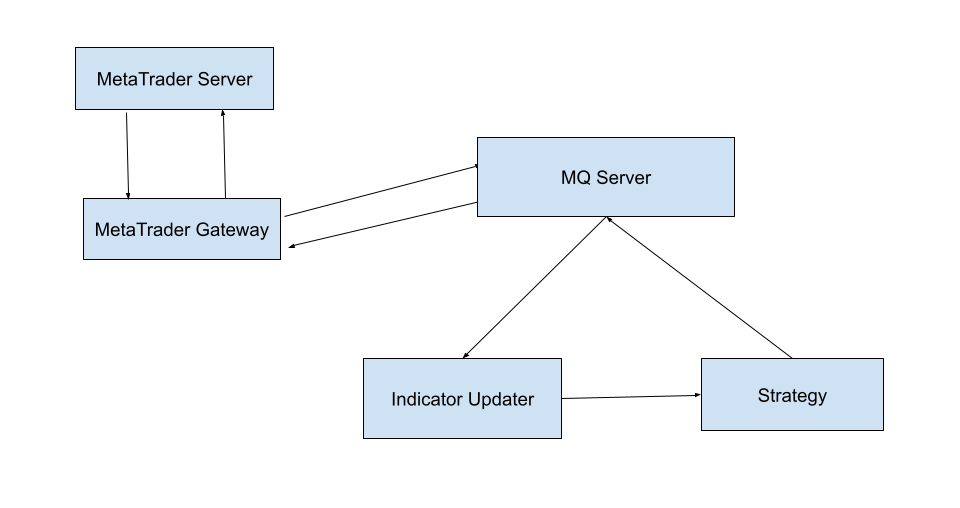
The full system has four parts:
- a message queue server that relays prices and orders (I use my own TYO-MQ, a socket.io pub/sub server)
- one gateway per broker, which publishes prices and executes orders
- an indicator updater that recalculates on each new bar
- a strategy that turns indicators into buy and sell signals
The gateway is the smallest part, but it's the one that touches real money, so it has to be boring and reliable. At minimum it needs to:
- get price updates
- submit an order when a signal arrives
- close the position when it's time to exit
Account balance, open positions and historical data are useful extras. I added them later.
Starting the terminal
The Python package doesn't contain a terminal. It connects to one over local IPC, starting it first if it isn't already running.
import MetaTrader5 as mt5
terminal_path = r"C:\Program Files\MetaTrader 5\terminal64.exe"
if not mt5.initialize(path=terminal_path, portable=False, timeout=12000):
print("initialize() failed, error code =", mt5.last_error())
raise SystemExit(1)
print(mt5.terminal_info())
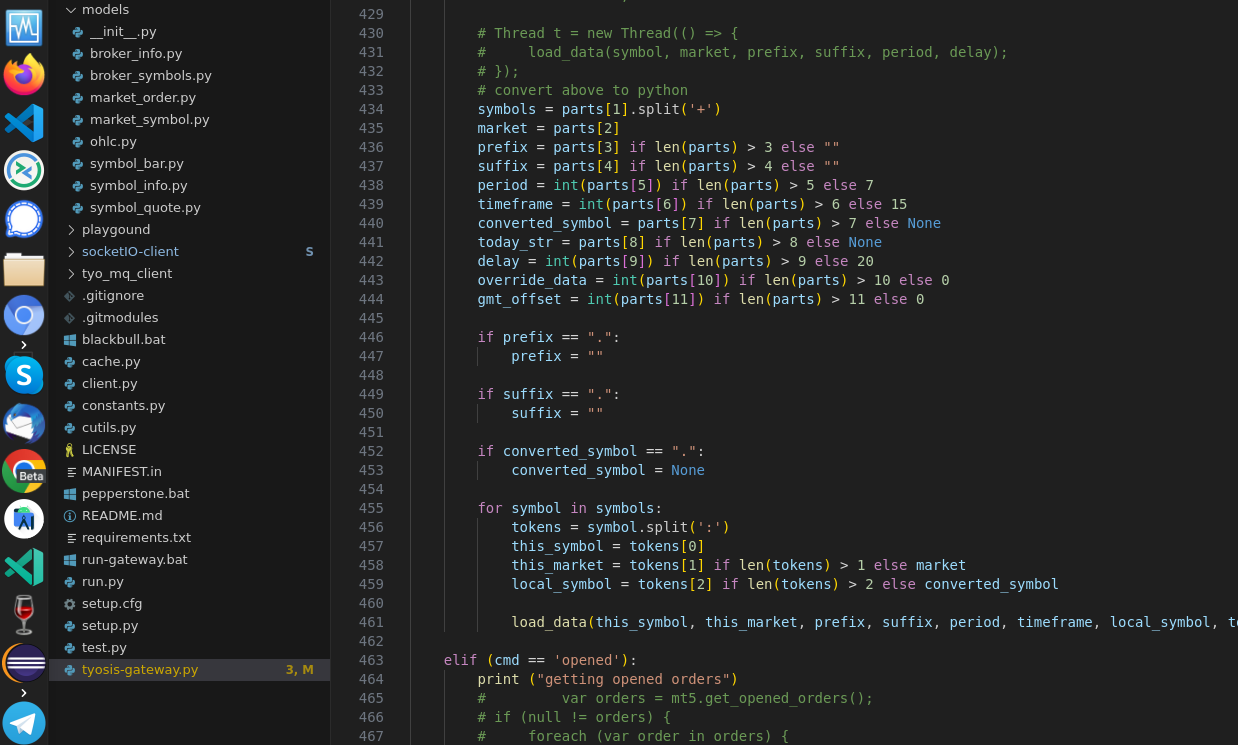
pathpoints to the broker'sterminal64.exe. Every broker ships the same MetaTrader 5 terminal with different branding and a different install folder. My gateway takes it as a command-line argument (--terminal-path), so one script serves every broker.timeoutis in milliseconds. I use 12 seconds. If the terminal hasn't answered by then, something is wrong, and I'd rather fail fast than hang.portable=Truekeeps the terminal's data in its own folder. It's handy if you copy one terminal into several directories to run several accounts side by side.
Logging in
authorized = mt5.login(account, password=password, server=server, timeout=60000)
if authorized:
print("Login successful")
else:
print("Login failed, error code =", mt5.last_error())
server is the trade server name exactly as the terminal shows it, for example Pepperstone-Demo or Eightcap-Demo. I pass the account, password and server on the command line from a small per-broker launch script, so the gateway code itself never contains credentials. Keep those scripts out of version control. That's advice I should take more seriously myself.
Getting price updates
The biggest limitation of the Python package is that there are no push notifications for new ticks. You have to poll. (In MQL you'd get OnTick; here you don't.) The symbol also has to be in the terminal's Market Watch, so call mt5.symbol_select(symbol, True) once at start-up.
Here is a poller that asks for every tick since the last one it saw, every five seconds:
import threading
from datetime import datetime, timedelta, timezone
import MetaTrader5 as mt5
SYMBOL = "BTCUSD" # brokers name it differently: BTCUSD, BITCOIN, ...
POLL_SECONDS = 5.0
mt5.symbol_select(SYMBOL, True)
last_tick_time = datetime.now(timezone.utc) - timedelta(minutes=2)
def check_updates():
global last_tick_time
try:
now = datetime.now(timezone.utc)
ticks = mt5.copy_ticks_range(SYMBOL, last_tick_time, now, mt5.COPY_TICKS_ALL)
if ticks is not None:
for tick in ticks:
tick_time = datetime.fromtimestamp(tick["time_msc"] / 1000, tz=timezone.utc)
if tick_time <= last_tick_time:
continue # the range is inclusive; skip what we've already sent
publish_quote(SYMBOL, tick_time, tick["bid"], tick["ask"], tick["last"])
last_tick_time = tick_time
finally:
# always reschedule, even when there were no new ticks or something threw
threading.Timer(POLL_SECONDS, check_updates).start()
check_updates()
publish_quote is where the gateway hands the price to the rest of the system. In mine that's a publish to the message queue. ZeroMQ, Redis, Kafka or a plain HTTP POST would all work.
Three details in that loop come from bugs I actually had:
- Reschedule in
finally. My original version only scheduled the next poll after it had processed some ticks. The first quiet period (a weekend, or a market that hadn't opened yet) returned nothing, the function returned early, and the gateway silently stopped polling. - Use timezone-aware UTC everywhere.
copy_ticks_rangeexpects UTC, and tick timestamps are epoch seconds. Usedatetime.fromtimestamp(..., tz=timezone.utc), not the bare version, which converts to the machine's local time. The broker's server time shown in the terminal (often UTC+2 or UTC+3) is a separate thing again, so don't mix the two. - De-duplicate on the boundary. The range includes its start time, so without the
<=check you re-send the last tick on every poll.
Polling every five seconds is fine for bar-based strategies. It's obviously not for high-frequency trading.
Placing an order
When the strategy sends a signal, the gateway builds a trade request and calls order_send:
def place_order(symbol, order_type, volume, price=0.0, sl=0.0, tp=0.0, comment=""):
info = mt5.symbol_info(symbol)
if info is None:
mt5.symbol_select(symbol, True)
info = mt5.symbol_info(symbol)
if info is None:
print("Unknown symbol:", symbol)
return None
if price <= 0:
tick = mt5.symbol_info_tick(symbol)
price = tick.ask if order_type == mt5.ORDER_TYPE_BUY else tick.bid
request = {
"action": mt5.TRADE_ACTION_DEAL,
"symbol": symbol,
"volume": float(volume),
"type": order_type, # mt5.ORDER_TYPE_BUY or mt5.ORDER_TYPE_SELL
"price": float(price),
"sl": float(sl),
"tp": float(tp),
"deviation": 20, # max slippage in points
"magic": 0,
"comment": comment[:31], # MT5 rejects comments longer than 31 characters
"type_time": mt5.ORDER_TIME_GTC,
"type_filling": pick_filling_mode(info),
}
result = mt5.order_send(request)
if result is None:
# a malformed request (e.g. an int where a float is expected) returns None
print("order_send returned None:", mt5.last_error())
return None
if result.retcode != mt5.TRADE_RETCODE_DONE:
print("Order rejected:", result.retcode, result.comment)
return None
return result.order # the ticket
order_send returns None, not an error code, if the request itself is malformed. The usual cause is passing an int where a float is expected, which is why every number above is wrapped in float(). Always check for None before reading retcode.
For pending orders, use mt5.TRADE_ACTION_PENDING with ORDER_TYPE_BUY_LIMIT, ORDER_TYPE_SELL_STOP and so on.
Choosing the filling mode
This one cost me the most time. Hard-coding ORDER_FILLING_IOC, as my first version did, works at some brokers and gets rejected at others with TRADE_RETCODE_INVALID_FILL. Which modes a symbol accepts is in symbol_info(symbol).filling_mode, a bitmask:
def pick_filling_mode(info):
if info.filling_mode & 2:
return mt5.ORDER_FILLING_IOC
if info.filling_mode & 1:
return mt5.ORDER_FILLING_FOK
return mt5.ORDER_FILLING_RETURN
For forex, metals and CFDs, volume is rarely the constraint, so IOC and FOK behave almost the same in practice. What matters is sending a mode the broker accepts.
Closing a position
To close a position you send the opposite deal and include the position ticket:
def close_position(ticket):
positions = mt5.positions_get(ticket=int(ticket))
if not positions:
print("No open position with ticket", ticket)
return False
pos = positions[0]
mt5.symbol_select(pos.symbol, True)
info = mt5.symbol_info(pos.symbol)
tick = mt5.symbol_info_tick(pos.symbol)
if pos.type == mt5.POSITION_TYPE_BUY:
close_type, price = mt5.ORDER_TYPE_SELL, tick.bid
else:
close_type, price = mt5.ORDER_TYPE_BUY, tick.ask
request = {
"action": mt5.TRADE_ACTION_DEAL,
"symbol": pos.symbol,
"volume": float(pos.volume),
"type": close_type,
"position": int(pos.ticket),
"price": price,
"deviation": 20,
"magic": 0,
"type_time": mt5.ORDER_TIME_GTC,
}
# try the modes the symbol advertises, then fall back to the others
modes = [m for bit, m in ((2, mt5.ORDER_FILLING_IOC),
(1, mt5.ORDER_FILLING_FOK),
(4, mt5.ORDER_FILLING_RETURN))
if info is not None and info.filling_mode & bit]
for m in (mt5.ORDER_FILLING_IOC, mt5.ORDER_FILLING_FOK, mt5.ORDER_FILLING_RETURN):
if m not in modes:
modes.append(m)
for mode in modes:
request["type_filling"] = mode
result = mt5.order_send(request)
if result is not None and result.retcode == mt5.TRADE_RETCODE_DONE:
return True
if result is None or result.retcode != mt5.TRADE_RETCODE_INVALID_FILL:
break # a real rejection (market closed, bad price...), not a fill-mode problem
print("Failed to close", ticket, getattr(result, "retcode", None), mt5.last_error())
return False
Looking the position up by ticket, rather than trusting the symbol and volume my strategy remembered, fixed a class of failures where the symbol name my strategy used didn't match the symbol on the broker's position, so the close went to the wrong (or a non-existent) symbol. The retry loop is there because a close that fails on fill mode leaves you holding a position you meant to exit.
When to exit is the strategy's job, not the gateway's. Either the trade works and you take profit at a target or when the trend turns, or it doesn't and the stop-loss takes you out. The gateway just executes the close reliably.
What production changed
My first version of this gateway was roughly the code in the original post. These are the changes that running it for real forced on me:
- The poll loop must never die. Reschedule in
finally. A gateway that quietly stops sending prices is worse than one that crashes, because nothing alerts you. - Read the broker's rules from
symbol_info, don't hard-code them. Filling mode and even the symbol name differ between brokers.symbol_infoalso hasvolume_minandvolume_stepif you need to round order sizes. - Serialize trading commands. My gateway runs order commands through a single-worker queue, so an open and a close for the same position can never race each other. Tick polling for many symbols runs in a small thread pool instead.
- Watch the message-queue connection, not just MetaTrader. Socket connections drop, especially overnight. The gateway sends a heartbeat every 30 seconds and forces a reconnect if it fails, then re-sends its broker info so subscriptions are restored on the server side.
- Run one gateway process per broker terminal. Each one has its own launch script with the terminal path, server and account. When one broker's terminal misbehaves, the others keep running.
What's next
Part 2 will cover the messaging side: how the gateway publishes quotes and receives order commands through the message queue, and how the strategy side subscribes.
If you'd rather skip MetaTrader entirely, I've also written about using the FIX API as a trading gateway in C#.
Contact
Keep reading


Latest Articles


What Profitable ASX Day Traders Have in Common
November 10, 2026


Why Paid Signal Groups Fail
November 7, 2026

Comments (0)
Leave a Comment